Rate Cards
Rate Cards
The Rate Cards tab in the Stack Console allows administrators to define and manage pricing models associated with different account types. Rate cards help standardize pricing for customers, vendors, and resellers, and can be marked as defaults for system-wide application. This guide outlines the steps to configure a new rate card effectively.
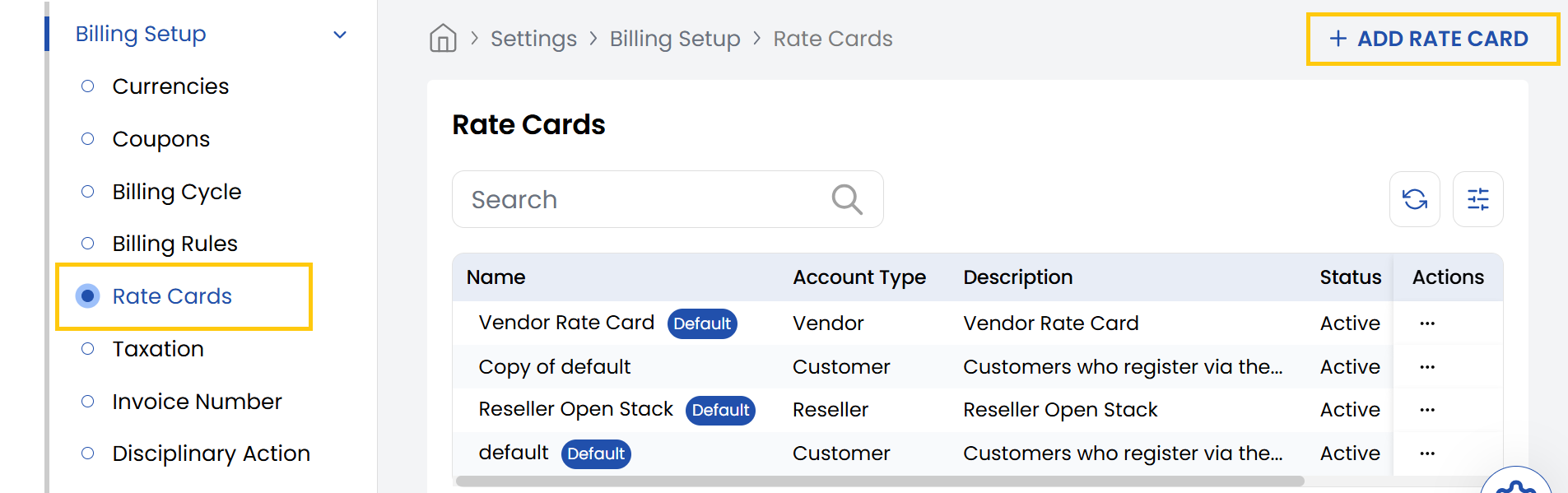
- From the left-hand side of the page under the Billing Setup section, click on Rate Cards to view the list of rate cards.
- To create a new rate card, click on Add Rate Card.
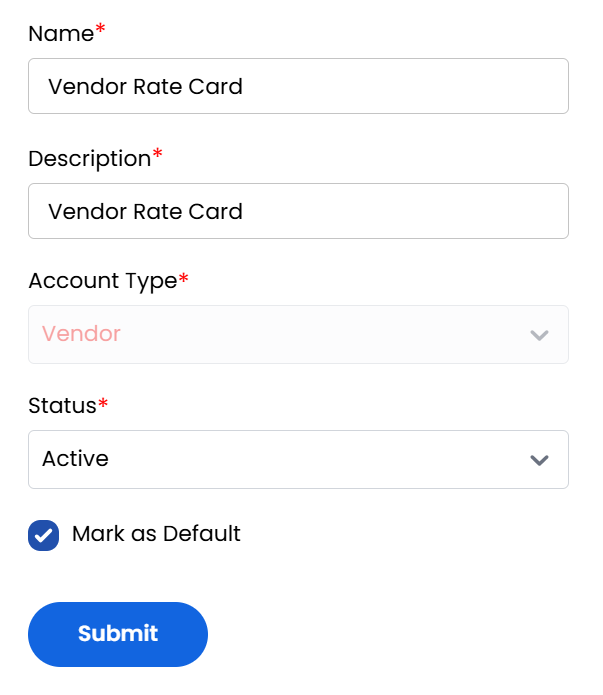
- Name: Provide a clear and unique name for the rate card.
- Description: Enter a short summary describing the purpose or scope of the rate card.
- Account Type: Choose the type of account this rate card will apply to from Customer, Vendor and Reseller.
- Status: Set the rate card to Active/Inactive to make it available in the system.
- Mark as Default: Check this box if this should be the default rate card for new accounts under the selected account type.
- Review all details for accuracy. Click Submit to save and activate the rate card.
Conclusion
The Rate Cards section provides centralized management of pricing models for different account types. For rate card configuration assistance, contact Stack Console support.